

Revolutionize your simulation process and data management!
What is i-SPiDM?

Lean Business Portal
- Use data tool-agnostically
- Provide and visualize results
- needs-based integration into the toolchain

Origin
- developed by DENTSU SOKEN
- based on the CAE-ONE framework
- Market entry in Japan in 2022

Currently in use
- Automobile manufacturing
- Mechanical and plant engineering
- Medical technology
Manage your simulations centrally
Do you have to painstakingly gather your data for simulations from various disciplines?
We often experience that data relevant to simulations is distributed across different disciplines.. Often, there is also a lack of an overview of the current status, or the simulations are not integrated into the tool chain.
The result: poor insight into simulation results and a high manual effort in creating simulations.
With the Japanese tool i-SPiDM from DENTSU SOKEN, you can find a solution:
Manage your simulation tasks and results centrally.
This allows you to always obtain the current status from the perspective of the simulated components. You can use i-SPiDM flexibly as needed:
- as a stand-alone tool for smaller companies without PLM, that still want to manage different simulations centrally
- linked to your PLM system for efficient versioning of the simulation input
- connected to simulation servers of common simulation tools, in order to start simulation jobs directly from i-SPiDM

Simulation Process & Data Management

Process Management
Management and standardization of processes from the simulation request to the analysis.
- Simple, user-friendly access via web browser
- Job Scheduling for Multiple CPU Servers
- Reusable task elements with input parameters and files
- Automatic saving of input/output data after completion of the task
- Resource (License/CPU/Memory) Monitoring Report with Chart

Data Management
Save, retrieve, and manage data generated during the simulation process.
- Account-related access rights to data structures
- Search function by attributes or full text
- Approval and allocation workflows
- Referencing data and document revision management
- Use of templates for various simulation processes
- Discussions directly at the source

Parameter Management
Automated control and parameterization of simulation models.

Traceability and Versioning
Ensure that previous versions and their results are easily accessible.

Collaboration and Integration
Support of collaboration between different disciplines, teams, and tools.
Lean Simulation with i-SPiDM
Through browser-based access and the streamlined interface, you enable your developers, simulation, and test engineers to collaborate quickly and easily.
Developers can create simulation requests for newly designed components with just a few clicks. Simulation and test engineers always have an overview of their upcoming simulation jobs and can easily add results. In the case of linked simulation servers, you can even start the jobs directly from i-SPiDM and receive the results automatically.


Integration of SPDM into your toolchain
Integrate i-SPiDM into your modular toolchain and consolidate your data in one place. Revolutionize your schedule management!
i-SPiDM as Standalone-Tool
Use i-SPiDM independently as a stand-alone tool: create new tasks and simulation requests directly in the tool and upload simulation results manually.
You already benefit at this stage from the central management of your simulation data.

Job Scheduler
Automate your simulations!
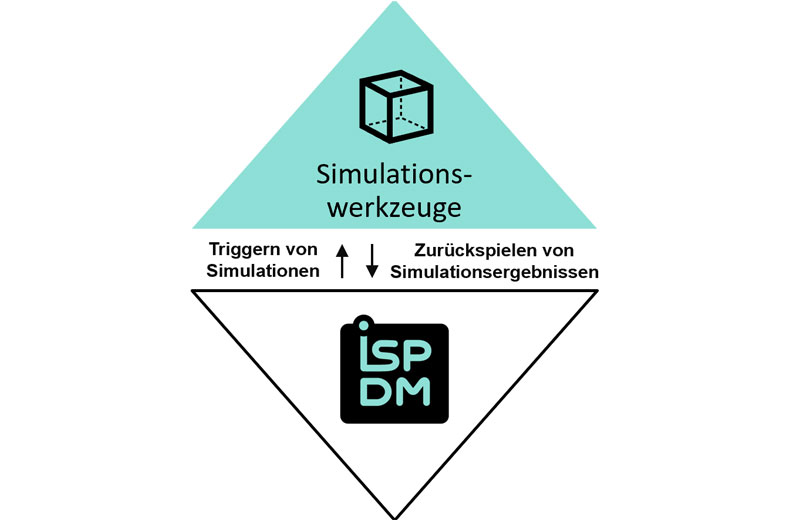
The integration with simulation tools allows you to start new jobs from a simulation request in i-SPiDM. The simulation results are automatically returned to i-SPiDM upon completion of the simulation.
Schedule Management
Keep track!
By connecting to the schedule management in our MBSE tool iQUAVIS, you benefit from continuity in task planning. Tasks and simulation requests are transferred from iQUAVIS and form the task structure in i-SPiDM. Simulation reports can then be fed back as results.

PDM and PLM
Central data management and data consistency!
Take advantage of the enhanced versioning capabilities of your PDM/PLM system. Export your CAD data directly from the PDM/PLM system and import simulation results back.

"Lean Simulation Management" with i-SPiDM"
You are currently viewing a placeholder content from YouTube. To access the actual content, click the button below. Please note that doing so will share data with third-party providers.
More InformationFAQ zu i-SPiDM
Yes, that is possible:
Tasks provide the structure. All requests, jobs, and discussions are assigned to individual tasks and thus linked.
Simulations are managed via the internal job scheduler of i-SPiDM. The simulation tools are triggered based on availability. A batch file is used to pass the input data and parameters, and the results are stored in i-SPiDM.
Yes, the data is stored in an SQL database that can be accessed with the appropriate access rights.
The memory requirement depends heavily on the type and number of simulations. A general answer is not possible.
Yes, templates can be created for different tools and simulations, which, for example, require different inputs or parameter entries.
Yes, our admin can customize the design.
Your competent partner for Lean Engineering
Since 2018, Two Pillars GmbH has stood for holistic systems engineering. Under the leadership of Dr. Christian Tschirner and Dr. Christian Bremer, we distribute the MBSE tool iQUAVIS for our Japanese parent company DENTSU SOKEN in the DACH region.
In addition to our role as a tool vendor, we also provide consulting services and support your entry into systems engineering with workshops and consulting.
In 2025, we added i-SPiDM to our product portfolio.

Get to know i-SPiDM?
Are you wondering if i-SPiDM is right for you? Or do you have individual questions about i-SPiDM?
We are happy to answer all your questions and present the tool to you in a short live demo – taking your use case into account. The initial consultation is, of course, free of charge.
Simply fill out the form, and we will get back to you promptly with a proposed appointment or further information, thank you!
Lean Engineering
Two Pillars specializes in Lean Engineering Tools, that is, lightweight tools that bring you quick successes in your product development.